What Can You Do on kodiipay?
For Tenants
- Pay rent instantly with M-Pesa STK Push, M-Pesa Till, Paybill, or Bank Transfer
- Top up wallet with M-Pesa, Paybill, or Bank Transfer — your phone number acts as your account number
- Send money to contacts and request money from others
- Pay any merchant M-Pesa Till — goods, services, and more
- Request maintenance and track repairs
- Chat directly with your landlord
- Build payment history and reputation with on-time payments
- Withdraw money anytime to M-Pesa, your registered bank PayBill, or a merchant Till
For Landlords
- Manage unlimited properties and units
- Receive rent payments instantly and securely
- Send formal notices (vacate, rent increase, eviction, lease renewal, maintenance, general)
- Track maintenance requests and repairs
- View analytics, earnings, and detailed reports
- Budget planning and expense tracking (Premium)
- Team management and document storage (Premium)
- Withdraw earnings instantly to M-Pesa or your bank account
Complete Guide for Tenants
Everything you need to know to use kodiipay as a tenant
Download & Create Your Account
Step 1: Download kodiipay from Google Play Store (Android) or Apple App Store (iOS)
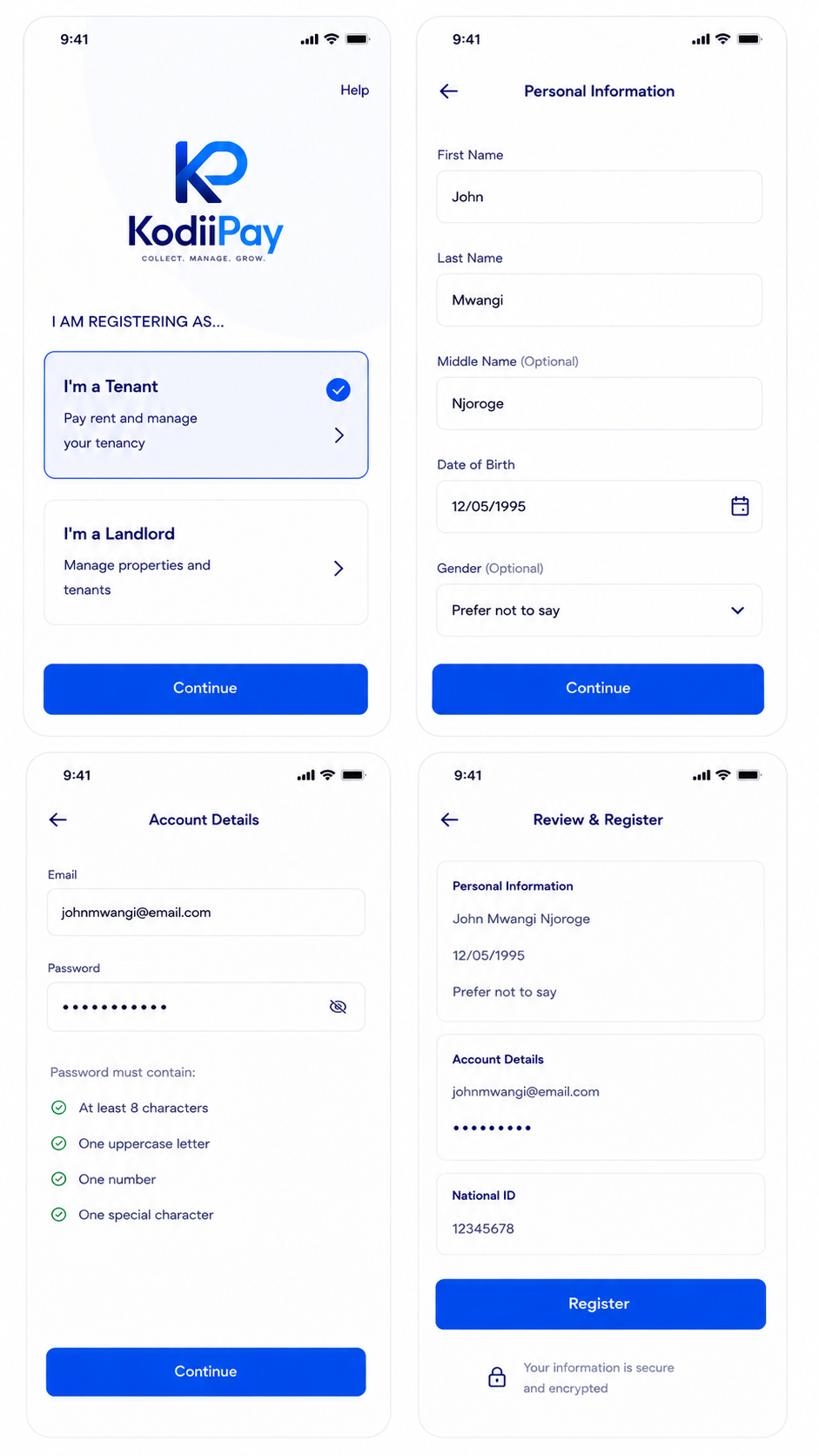
Step 2: Open the app - you'll see a Welcome screen asking "I AM REGISTERING AS..."
Step 3: Select "I'm a Tenant" and tap "Continue"
Step 4: Fill in your personal information:
- First Name (required)
- Last Name (required)
- Middle Name (optional)
- Date of Birth (format: DD/MM/YYYY)
- Gender (optional, defaults to "Prefer not to say")
Step 5: Enter your email and create a strong password
Step 6: (Optional) Enter your National ID details if you have them ready
Step 7: Tap "Register" to create your account
Step 8: Set up App Lock (biometric/PIN) for security
Tip: Your account is now created! You can explore the app, but you'll need to complete KYC verification to unlock full features like paying rent and withdrawing money.
Complete KYC Verification
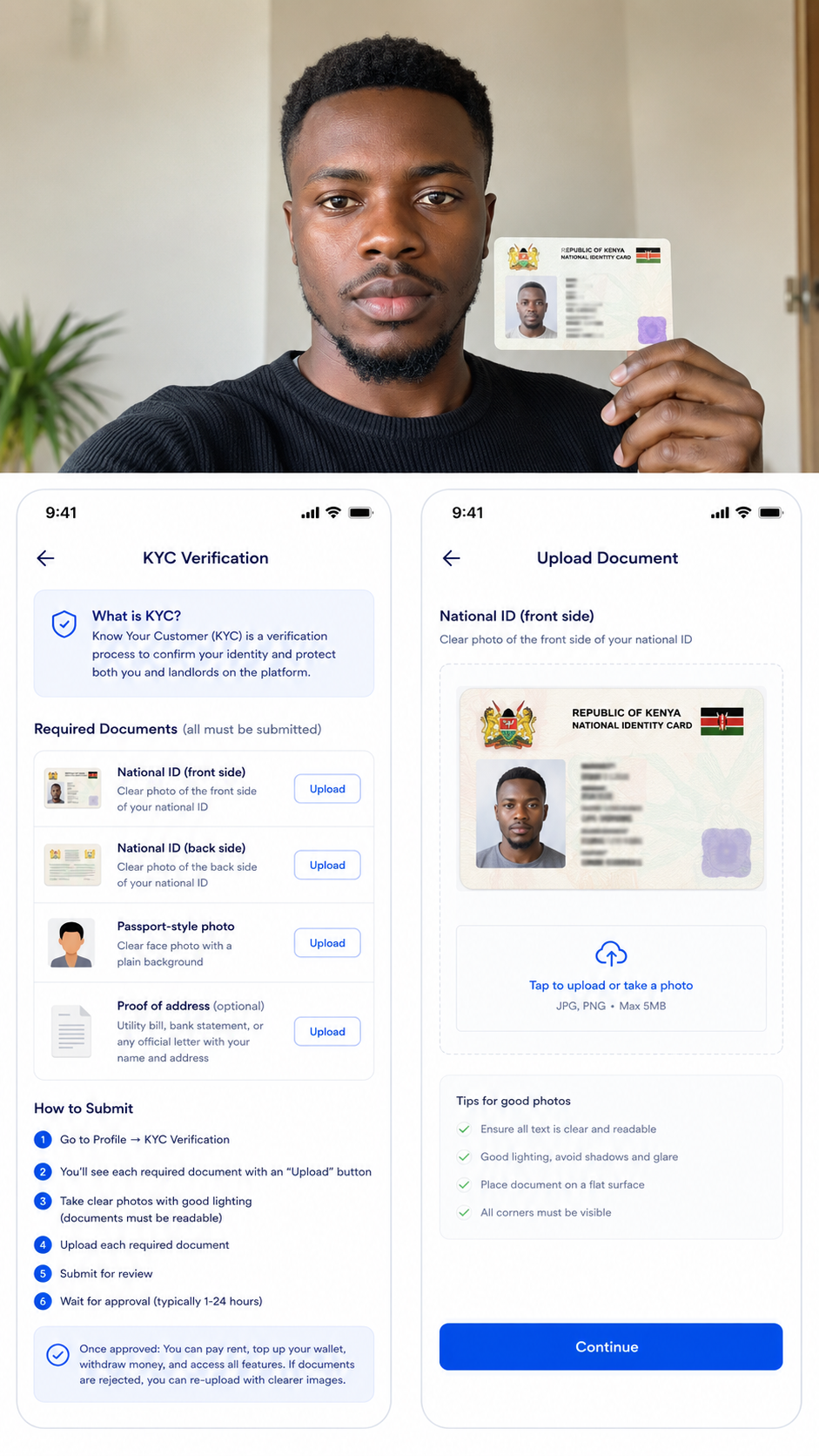
What is KYC? Know Your Customer (KYC) is a verification process to confirm your identity and protect both you and landlords on the platform.
Required Documents (all must be submitted):
- National ID (front side)
- National ID (back side)
- Passport-style photo (clear face photo)
- Proof of address (optional) — utility bill, bank statement, or any official letter with your name and address
How to Submit:
- Go to Profile → KYC Verification
- You'll see each required document with an "Upload" button
- Take clear photos with good lighting (documents must be readable)
- Upload each required document
- Submit for review
- Wait for approval (typically 1-24 hours)
✓ Once approved: You can pay rent, top up your wallet, withdraw money, and access all features. If documents are rejected, you can re-upload with clearer images.
Find & Accept Your Unit Invitation
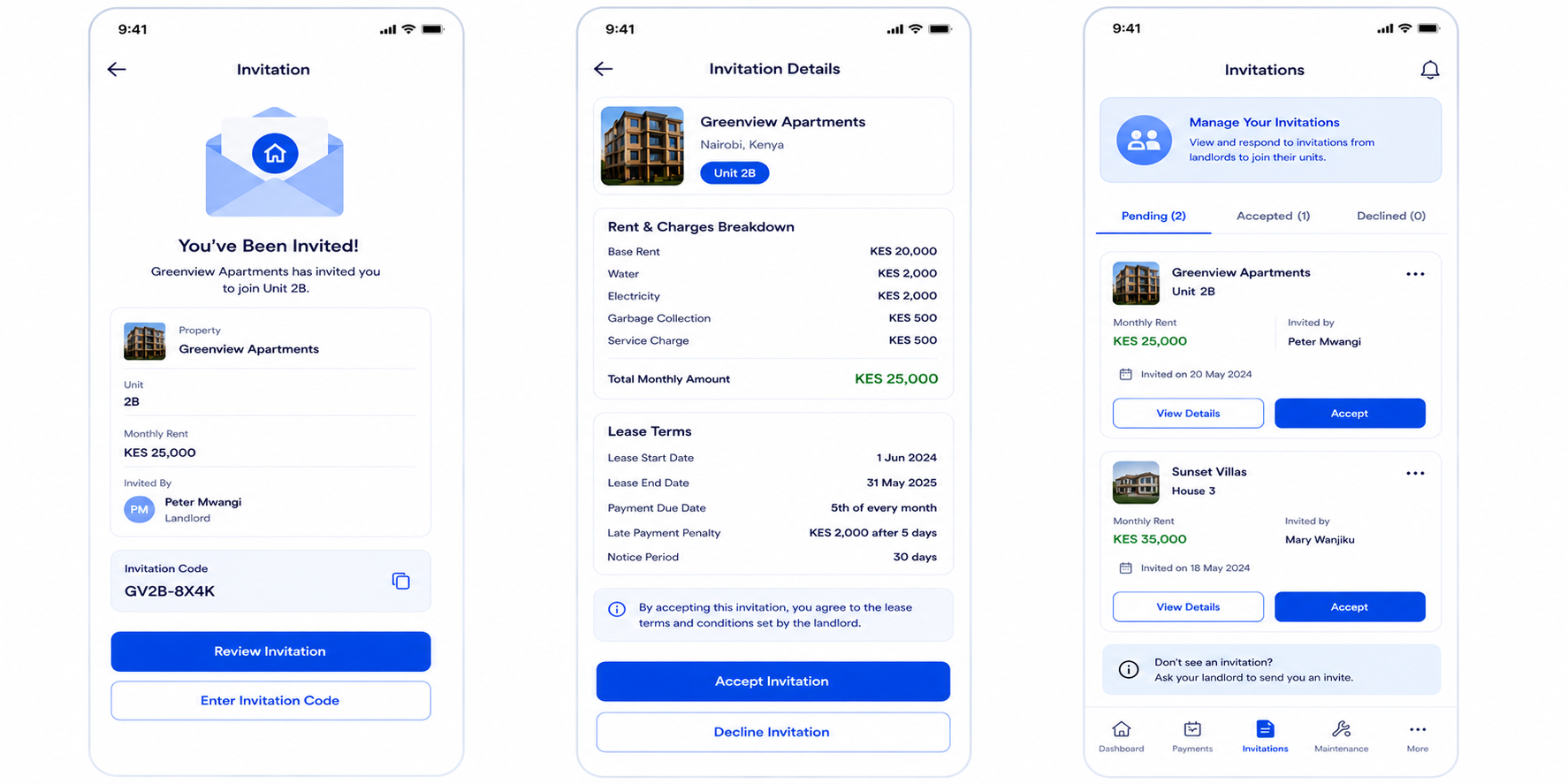
A landlord needs to invite you to their unit before you can start paying rent. You'll receive an invitation via SMS or in-app notification.
If You've Been Invited by SMS:
- You'll receive an SMS with an invitation link or code
- Tap the link or enter the code in the app
- Review the unit details (property name, unit number, rent amount, charges breakdown)
- Review the lease terms
- Tap "Accept Invitation" to confirm
- The lease agreement is created automatically
If You're Waiting for an Invitation:
- Go to Dashboard → Invitations
- View pending invitations from landlords
- Select an invitation to review details
- Accept to create your tenancy
✓ After Accepting: Your tenancy becomes active, and rent starts getting billed on the due date. You're now ready to pay rent through your wallet.
Top Up Your Wallet
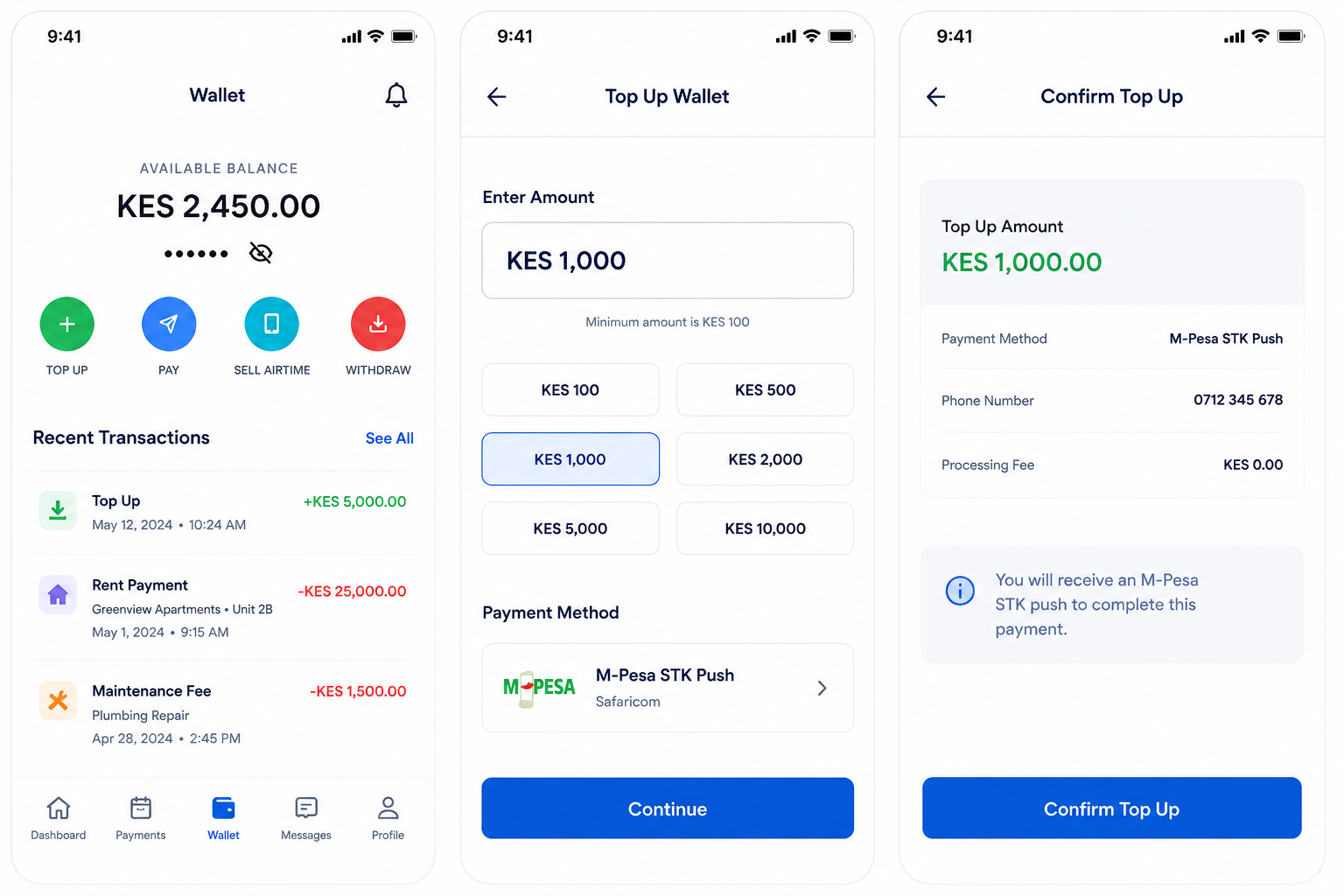
Your kodiipay wallet is where money sits until you pay rent. You need to add funds before making payments.
Payment Methods:
- M-Pesa STK Push (Safaricom)
- Paybill Bank Transfer — use your phone number as the account reference, funds arrive in minutes
How to Top Up:
- Go to Wallet → Tap "Top Up" button
- Choose your method: M-Pesa STK Push or Paybill Bank Transfer
- If using M-Pesa STK Push: enter the amount, confirm the prompt on your phone
- If using Bank Transfer: enter the kodiipay PayBill number and use your phone number as the account reference
- Enter the amount (minimum KES 100) and confirm
- Money appears in your wallet instantly
Note: Top-ups use M-Pesa STK Push or Paybill Bank Transfer. Minimum top-up is KES 100. Make sure your M-Pesa phone is set correctly in your profile.
Pay Your Rent
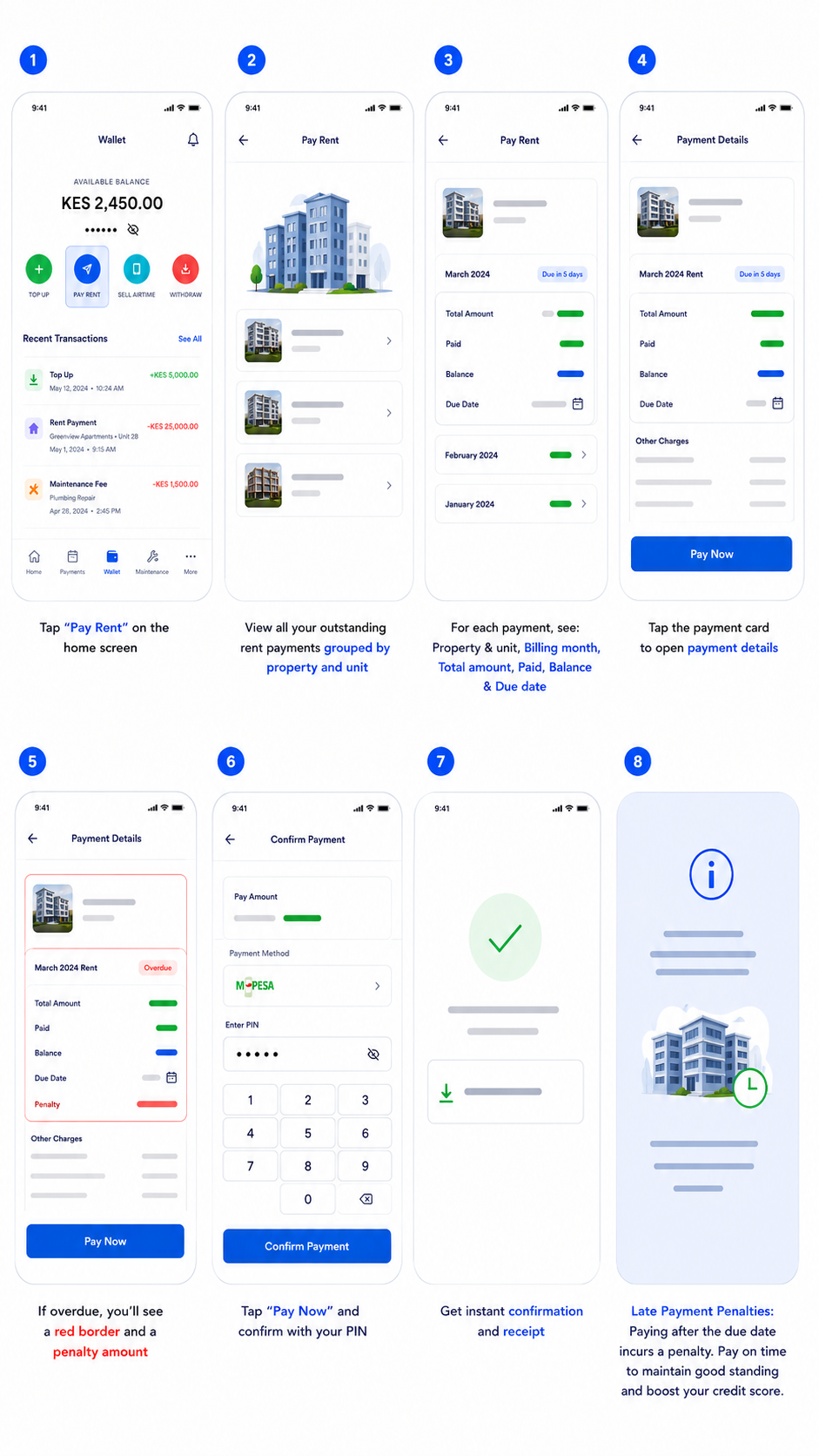
See what's due or overdue, tap the rent card, and pay with the method your landlord has enabled.
How to Pay Rent:
- Tap "Pay Rent" on the home screen
- View all unpaid rent as cards with due dates, billing month, and overdue status
- Select a card to see the property, unit, rent breakdown, and balance due
- Choose the payment method set by your landlord — wallet balance, M-Pesa STK Push, M-Pesa Till, Paybill, or Bank Transfer. If you choose Paybill or Bank Transfer, enter your phone number as the Account Reference and send from any banking app — rent goes directly to your landlord's PayBill. If your landlord has an M-Pesa Till, rent is sent straight to their Till (Buy Goods & Services) instead.
- If your wallet balance is low, the M-Pesa STK top-up prompt appears automatically
- Confirm the payment and get instant confirmation plus a receipt in your history
Late Payment Penalties: Overdue rent may incur a fee if your landlord chooses to apply one. Pay on time to keep your record clean and avoid extra charges.
Request Maintenance
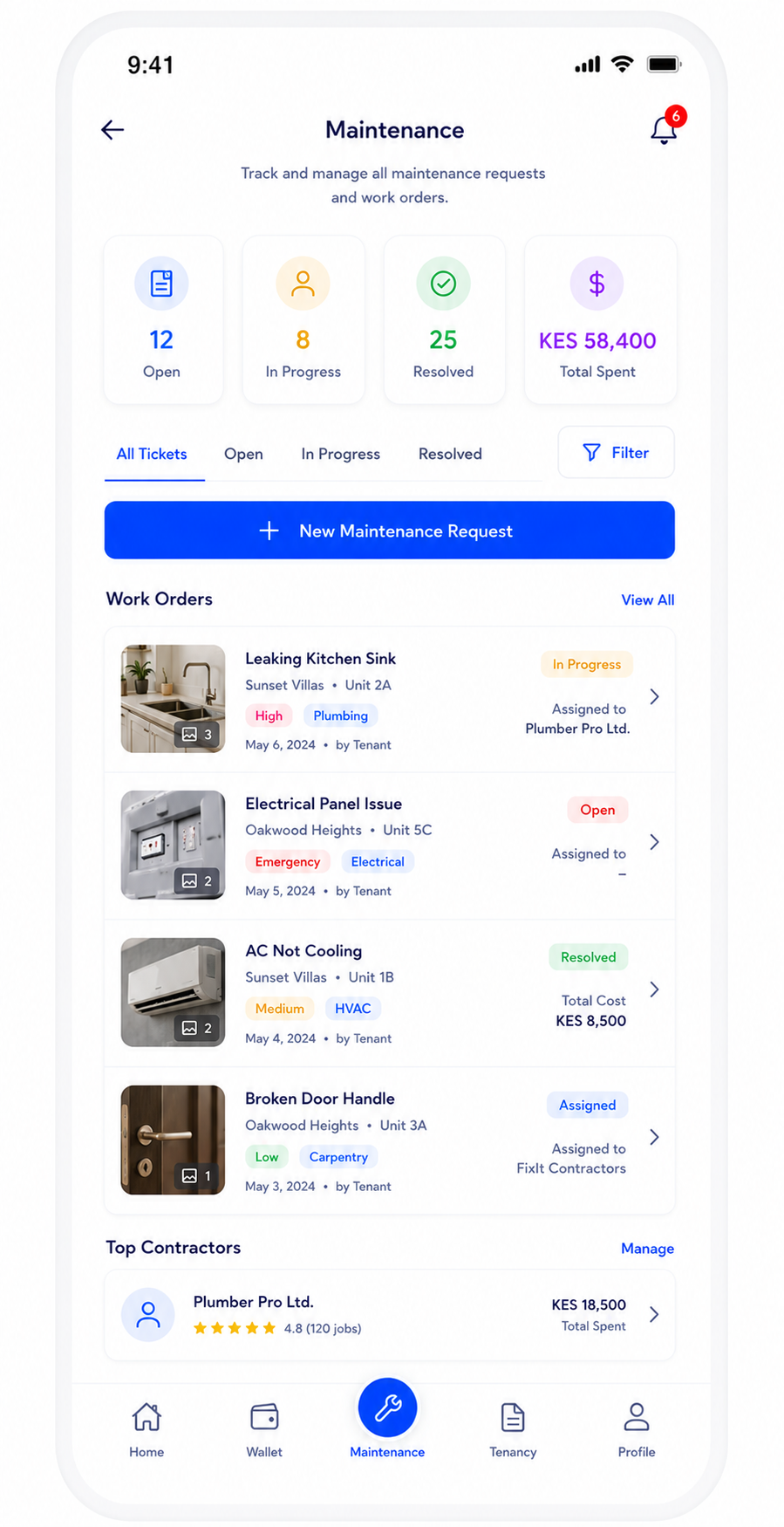
Something broken? Water leaking? Electrical problem? Report it instantly through the app.
How to Request Maintenance:
- Tap "Maintenance" from the menu
- Tap "Report New Issue"
- Select the category (plumbing, electrical, structural, etc.)
- Describe the problem in detail
- Attach photos showing the issue
- Set priority (Low, Medium, High, Emergency)
- Submit - your landlord gets instant notification
Tracking: You can track every repair request from submission through completion. See when it's assigned, in progress, and when it's resolved.
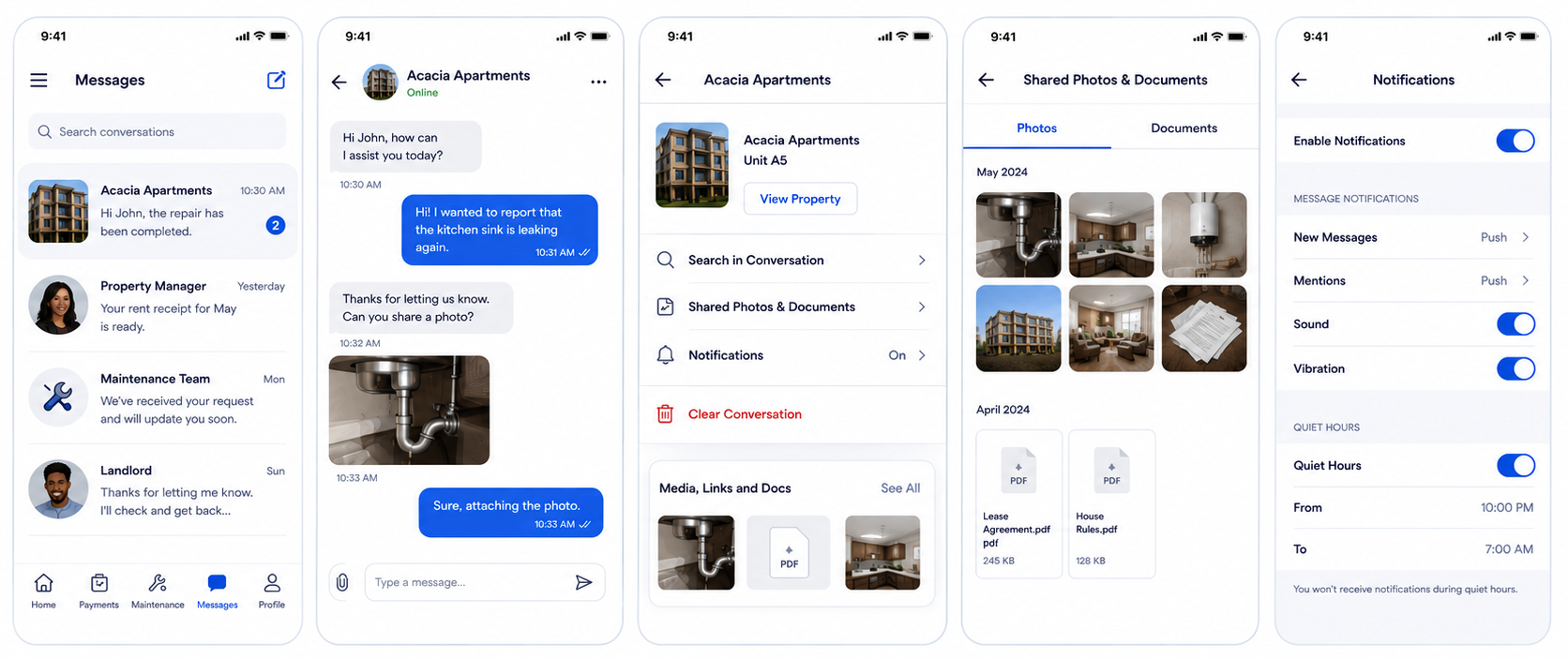
Chat with Your Landlord
Need to discuss rent, repairs, or lease terms? Use the built-in messaging system.
Withdraw Your Money
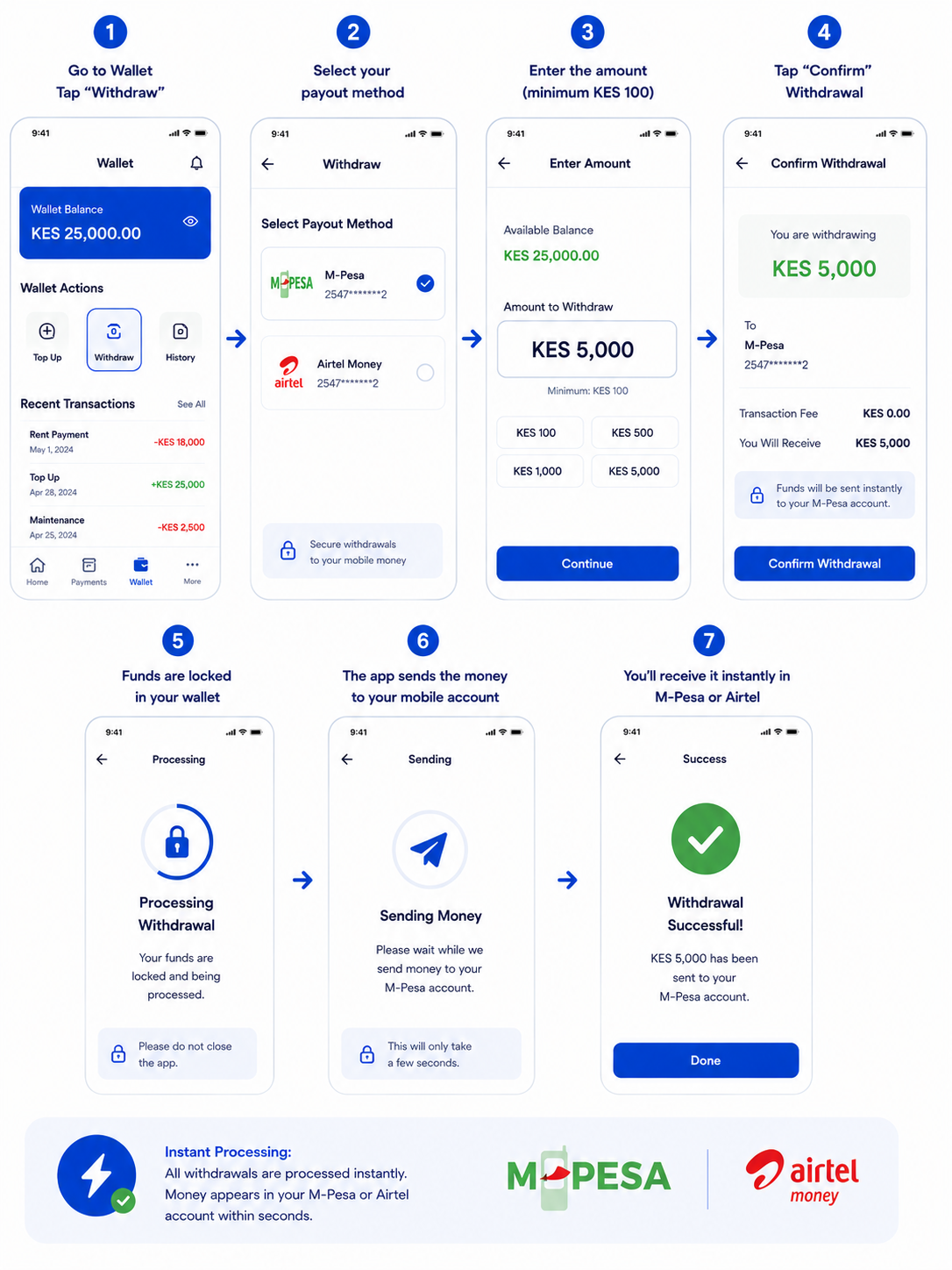
You can withdraw your wallet balance anytime to your M-Pesa account, M-Pesa Till, or directly to your bank PayBill account.
Requirements:
- KYC verification must be approved
- Must have added a payout method (M-Pesa, M-Pesa Till, or Bank/PayBill)
- Minimum withdrawal: KES 100
Available Payout Methods:
- ✓ M-Pesa (instant)
- ✓ Bank Transfer via PayBill — business number and account number come pre-filled from your saved payout method
Adding Payout Methods: Go to Profile → Payout Methods and add or change your methods anytime — M-Pesa, M-Pesa Till, or Bank (PayBill). Your saved methods are pre-selected when you withdraw.
How to Withdraw:
- Go to Wallet → Tap "Withdraw"
- Select your payout method (M-Pesa, M-Pesa Till, or Bank Transfer)
- If Bank Transfer: your registered PayBill business number and account number are already filled in
- Enter the amount (minimum KES 100)
- Tap "Confirm Withdrawal"
- Funds are locked in your wallet
- The app sends the money to your mobile account, bank PayBill, or merchant Till immediately
✓ Instant Processing: All withdrawals are processed instantly. Money appears in your M-Pesa or bank account within seconds.
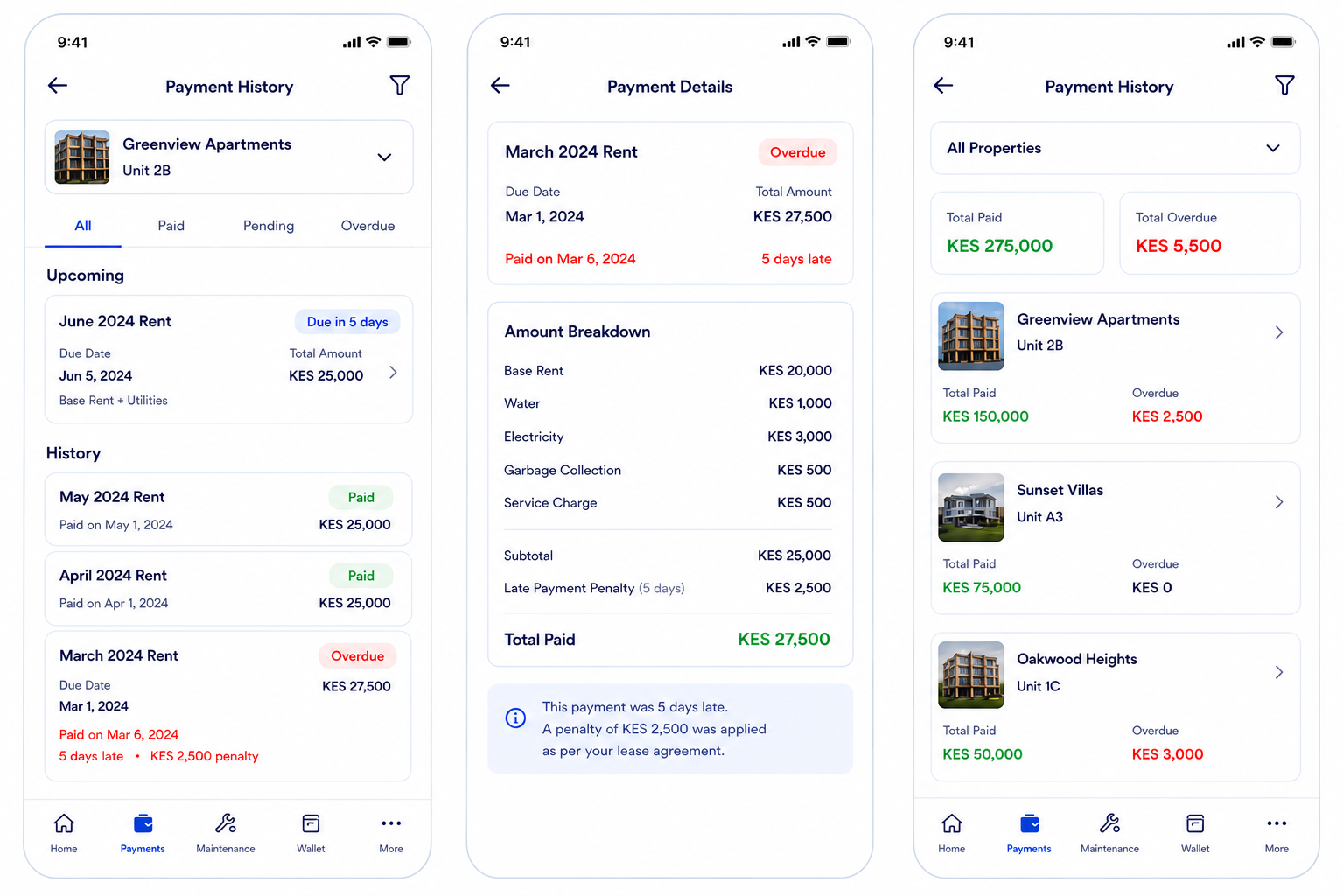
Stay on top of your rent payments with a complete history of all activity across every property and unit you've ever occupied.
Track Your Payment History

Build Your Payment History & Reputation
Your payment history is tracked on kodiipay. Future landlords can see your rent payment record when you apply for new properties.
What Gets Tracked
- All past rent payments (dates, amounts, properties)
- On-time vs. late payments
- How long payments are overdue (if any)
- Late payment penalties applied or waived
- Current tenant status (active or ended)
Why Does This Matter?
New landlords review your payment history when you apply to rent. A clean payment record with on-time payments makes you a preferred tenant and improves your chances of rental approval.
Pro Tip: Pay rent on or before the due date to maintain a perfect payment record.
Complete Guide for Landlords
Master the landlord tools and grow your rental business
Register as a Landlord
Step 1: Download kodiipay and open the app
Step 2: On the Welcome screen, select "I'm a Landlord" and tap "Continue"
Step 3: Fill in your personal information: First Name & Last Name, Middle Name (optional), Date of Birth, Gender (optional)
Step 4: Enter your email address and create a password
Step 5: Complete your business profile with KRA PIN and registration details
Step 6: Submit ID and proof of address for KYC verification
Step 7: Set up App Lock for security
Add Properties & Units
Add your properties and their units in one streamlined flow. The app guides you through each step.
How to Add:
- Go to Dashboard → Properties
- Tap "Add Property & Units"
- Step 1 - Property Details: Enter property name, type, county, sub-county, street address, description, year built, GPS coordinates
- Step 2 - Property Amenities: Select available amenities (parking, water, electricity, security, WiFi, gym, pool, CCTV, borehole, gated community)
- Step 3 - Property Photos: Upload cover photo and gallery images
- Step 4 - Unit Details: Enter unit number, optional unit name, floor number, bedrooms, bathrooms, size in sq ft, furnishing type, and unit amenities
- Step 5 - Unit Pricing: Set all charges: Base rent, Security deposit, Water charge, Electricity charge, Service charge, Garbage charge, Other charges (optional)
- Step 6 - Unit Photos: Upload unit photos
- Step 7 - Summary: Review everything and submit
✓ Important: You can add multiple units to each property, and multiple properties to your portfolio. The total monthly charge is automatically calculated (sum of all fees).
Invite Tenants to Your Units
When you have vacant units, you can search for and invite tenants. kodiipay helps you find existing users or add new ones.
How to Create an Invitation:
- Go to Dashboard → Invitations, or search for "Invitations"
- Tap "Create New Invitation"
- Enter the tenant's phone number
- Search Feature: The app searches for existing kodiipay tenant users with that phone number and shows them
- Select which unit they'll occupy (system shows only vacant units)
- Answer the rent cycle questions: choose whether the tenant has already paid or select the recurring rent cycle start date
- Optional: Add a personal message
- Set how many days the invitation expires (default: 7 days)
- Tap "Send Invitation"
What Happens After:
- If tenant is on kodiipay: They receive an in-app notification with unit details and can accept immediately
- Accepted invitation creates a lease agreement automatically
- Both sign digitally
- Rent billing starts on the agreed date
Tip: Keep your invitation expiry reasonable so tenants don't miss them. You can resend if needed.
Receive Rent Payments
See what’s due or overdue, select the rent card, and pay using the landlord’s chosen method.
Billing
Cards show due dates, billing month, rent breakdown, and balance remaining.
Reminders
Upcoming payments and overdue status are visible, with reminders available.
Payment
Choose wallet, M-Pesa STK Push, M-Pesa Till, or Paybill and confirm the payment.
Your Wallet
Rent collection updates your wallet balance and saves a receipt in history.
Late Payments
Overdue schedules show days late and penalty amounts if applied.
Waive
Landlords can waive penalties and manually adjust overdue charges.
Track Earnings & Analytics
Monitor all your rental income with detailed earnings analytics and transaction history.
Dashboard Features:
- Total earnings for the month (visual chart)
- Daily earnings breakdown (7-day view)
- All rent payments received with amounts and dates
- Transaction history (deposits from tenants, withdrawals made)
- Wallet balance (available funds)
- Tenant transaction details (who paid, how much, when)
How to View:
- Go to Dashboard → Earnings
- View this month's chart and summary
- Filter by different periods (previous months)
- Tap on any transaction for details
Send Formal Notices
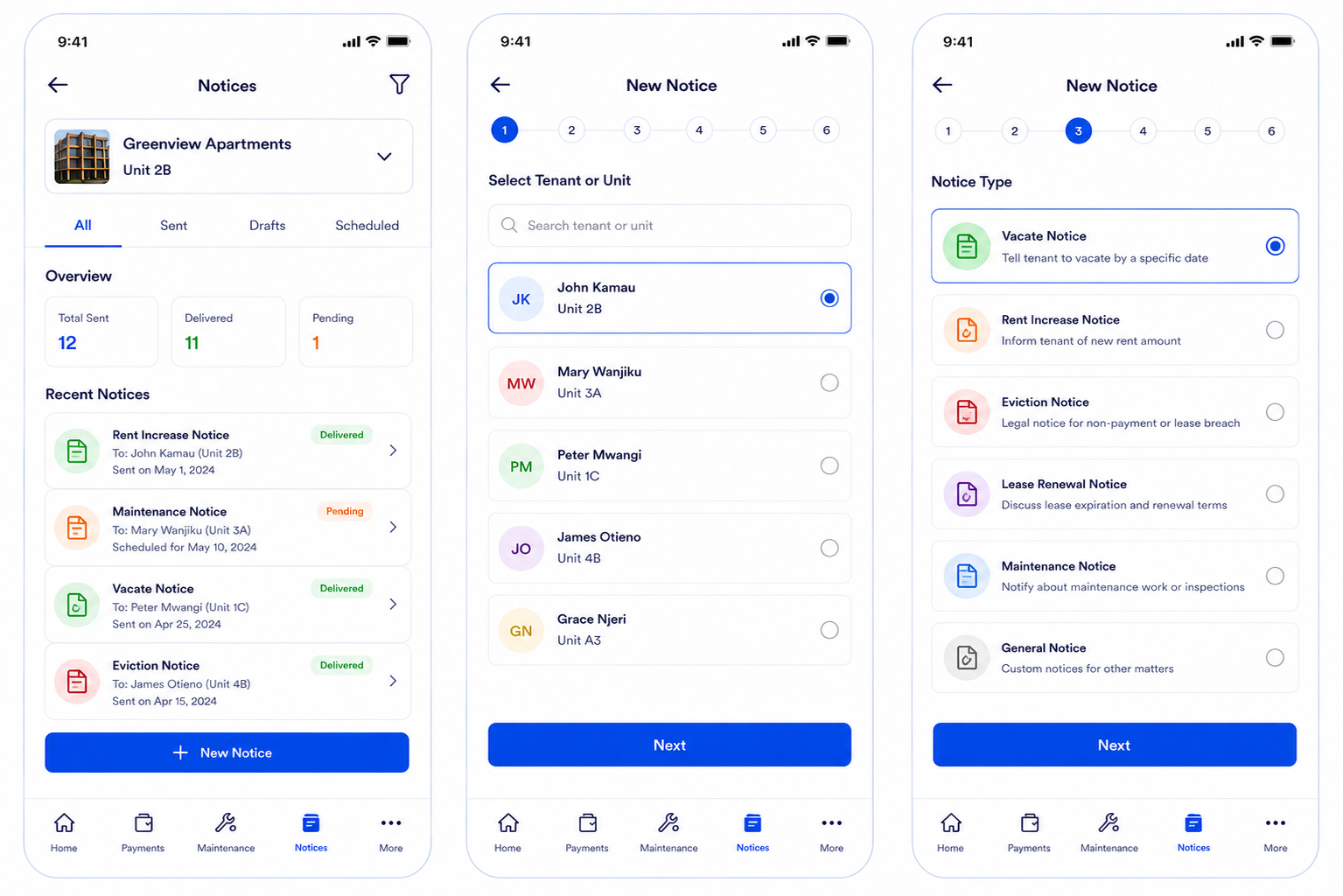
Send official notices to your tenants through the platform with proof of delivery.
Notice Types Available:
- Vacate Notice: Tell tenant to vacate by a specific date
- Rent Increase Notice: Inform tenant of new rent amount
- Eviction Notice: Legal notice for non-payment or lease breach
- Lease Renewal Notice: Discuss lease expiration and renewal terms
- Maintenance Notice: Notify about maintenance work or inspections
- General Notice: Custom notices for other matters
How to Send a Notice:
- Go to Notices → Tap "New Notice"
- Select the tenant or unit
- Choose notice type
- Write subject and message details
- Set effective date (if applicable)
- Send to tenant - they receive instant notification
✓ Legal Proof: The system records exactly when the notice was sent and when it was read by the tenant. This is legal proof for disputes.
Manage Maintenance Requests
When your tenant reports a maintenance issue, you'll get instant notifications and can track the entire repair process.
Tenant submits request with photos
You get instant notification
You review & assign to contractor
Contractor completes work & uploads photos
Tenant approves or requests adjustments
Mark as complete
Chat with Tenants
Communicate directly with your tenants without exchanging phone numbers or email addresses.
Withdraw Your Earnings
Every rent payment a tenant makes lands in your kodiipay wallet the moment it succeeds — credited to the right tenant and unit automatically. You can withdraw your accumulated earnings anytime to the payout method you previously selected.
Requirements:
- KYC verification must be approved
- Must have added a payout method (M-Pesa, M-Pesa Till, or Bank Transfer)
- Minimum withdrawal: KES 100
Available Payout Methods:
- ✓ M-Pesa (instant, to your M-Pesa account)
- ✓ M-Pesa Till (rent received directly to your merchant Till — Buy Goods & Services)
- ✓ Bank Transfer via Paybill (business number + account number are prefilled)
- Set them up anytime in Profile → Payout Methods — add or change M-Pesa, M-Pesa Till, or Bank (PayBill)
How to Withdraw:
- Go to Dashboard → Tap "Request Withdrawal"
- View your available wallet balance
- Your preferred payout method is pre-selected
- If Bank Transfer is selected, the Paybill business number and account number are already filled in
- Enter the amount (minimum KES 100)
- Tap "Withdraw"
- Funds are locked in your wallet immediately
- Money is sent instantly to your selected payout account
✓ Instant & Automatic: Withdrawals are processed instantly with no manual review. Money appears in your mobile account within seconds.
Additional Tenant Tools & Services
Beyond rent payments, kodiipay offers powerful tools to manage your finances and stay connected
Send Money to Contacts
Send money instantly to other kodiipay users - friends, family, or roommates - directly from your wallet.
How It Works:
- Go to Services → "Send Money"
- Search for contact by phone number or name (if they're on kodiipay)
- Enter the amount
- Add a note (optional)
- Tap "Send"
- Money transfers instantly to their wallet
- Both get instant notifications
Request Money from Others
Need to collect money from roommates or friends? Create a money request and send it to them for approval.
How to Request Money:
- Go to Services → "Request Money"
- Select the person to request from
- Enter the amount and reason
- Send the request
- They get a notification and can approve or decline
- If approved, money transfers to your wallet instantly
Complete Transaction History
Keep track of all your financial activities in one place - rent payments, deposits, withdrawals, and money transfers.
View Your History:
- Go to Services → "Payment History" or Dashboard → History
- See all transactions organized by date
- Filter by type (rent, deposits, withdrawals, transfers)
- View full details of any transaction
Tracked Transactions:
- Rent payments (to landlords)
- Money deposits (top-ups to wallet)
- Withdrawals (money sent to M-Pesa or your bank)
- Money sent to contacts
- Received money from others
Pro Tip: Use your transaction history for personal finance tracking and budgeting. You can also take screenshots for record-keeping.
Saved Contacts Library
Your most frequently contacted people are automatically saved. Send money to regular contacts in one tap.
How It Works:
- Every time you send money to someone, they're added to your recent contacts
- Most-used contacts appear at the top for quick access
- Tap a contact to send money immediately
- View all past transactions with each contact
Advanced Features for Landlords
Grow your rental business with premium tools and analytics
Budget Planner Premium
Plan and track your property expenses with intelligent budget forecasting. Know exactly where your money goes.
Budget Categories Supported:
Features:
- Create budgets by category (per unit or property-wide)
- Set monthly budget limits
- Track actual spending vs. budget
- View overspending alerts
- Export budget reports
Pro Tip: Use budget planning to predict profitability and identify cost-saving opportunities.
Expense Tracker Premium
Log every expense and attach receipts. Get detailed reports for tax purposes and profitability analysis.
How to Track Expenses:
- Go to Dashboard → Expense Tracker
- Tap "Add Expense"
- Select category
- Enter amount and date
- Add description and vendor name
- Attach receipt photo
- Save
Reporting Features:
- Monthly expense summary
- Breakdown by category
- Compare month-to-month trends
- Total expenses vs. income
- Generate PDF reports for accounting
Team Management Premium
Delegate tasks and assign roles to property managers, accountants, and viewers. Maintain security with role-based access.
Team Member Roles:
- Admin: Full control (can invite others, manage properties, send notices)
- Property Manager: Manage assigned properties (maintenance, maintenance tracking)
- Accountant: View finances and reports (earnings, expenses, budgets)
- Viewer: Read-only access to reports and data
How to Add Team Members:
- Go to Dashboard → Team
- Tap "Invite Team Member"
- Enter their email or phone
- Select their role
- Choose which properties they can access
- Send invitation
- They accept and gain access immediately
Security: Each team member can only access what you authorize. You can revoke access anytime.
Document Storage Premium
Store all important property documents, contracts, and receipts in a secure cloud vault. Access them anytime.
Documents You Can Store:
- Property deeds and titles
- Signed lease agreements
- Maintenance receipts and invoices
- Insurance certificates
- Tax documents
- Tenant correspondence
- Property photos
- Any other files
Features:
- Unlimited storage
- Organize by folders and tags
- Search documents by name or date
- Share documents with team members
- Download anytime
Receipt Verification All Plans
Every kodiipay receipt carries a unique QR code tied to the payment ledger. Scan it inside the app to confirm a payment is genuine — in seconds.
How to Verify a Receipt:
- Open the kodiipay app and tap the QR scan button in the header (or Services → Verify Receipt)
- Point the camera at the QR code on the receipt
- You can also type the receipt number or pick a downloaded PDF receipt
- Instantly see the status, amount, date, and channel confirmed against the ledger
Privacy: Verification only works inside the app, where you're signed in — receipts are never verified on this public website, so no payment details are exposed publicly.
How the money actually moves
kodiipay is a software platform — not a bank and not a mobile-money operator like Safaricom, M-Pesa or Airtel. Every payment is processed over Safaricom's Daraja APIs, the same regulated rails Kenyan banks and fintechs use. Your kodiipay wallet is a routing balance inside the app, not a bank account.
Money in — deposits & top-ups
Top up your wallet with an M-Pesa STK Prompt (Safaricom pushes the payment request to your phone, you enter your M-Pesa PIN, kodiipay never sees it) or a bank transfer sent to the kodiipay PayBill with your phone number as the account reference. Funds land and your wallet updates instantly.
Money across — bank transfers
A bank transfer is a PayBill transaction: the PayBill business number says who receives the money, and the account number says whose payment it is. You send from any banking app to your landlord's PayBill using your phone number (or account label) as the account number — the money is credited to the landlord's bank account, and credit can be reconciled instantly.
Money out — payouts
When a landlord or tenant withdraws, kodiipay instructs Daraja to move the money out: to a phone number via M-Pesa B2C, or to a bank account via the PayBill B2B rail. The money lands in the real M-Pesa or bank account within seconds.
Bank transfers, explained properly
Two numbers do all the work: A PayBill transfer needs a business number (who receives the money) and an account number (whose payment it is). Understanding this makes every bank-transfer payment on kodiipay click.
Paying rent by bank transfer: Your landlord's PayBill business number is shown in the app. You send from any banking app — Equity, KCB, M-PESA app, Co-op, ABSA — use your phone number as the account number, and the money is credited to your landlord's bank account. kodiipay matches it to your unit automatically and marks your rent paid.
Topping up your wallet: Send to the kodiipay PayBill using your phone number as the account number. The money lands in the PayBill owner's bank account and kodiipay credits your wallet.
Money lands in your bank account: When a landlord receives rent via PayBill, that's a real credit to their bank account — not held inside kodiipay. Payouts from the wallet go straight to your M-Pesa or your bank PayBill.
Not M-Pesa. Not Safaricom. Not a bank.
kodiipay is the software layer, not the money mover. Safaricom's Daraja APIs — STK Push, C2B PayBill, B2C and B2B — process the payments. That's why every transaction goes through the same infrastructure Kenyan banks and fintechs use.
It doesn't hold your money like M-Pesa or a bank, Your wallet balance is a reflected balance that lets payments happen instantly inside the platform. The actual money lives with Safaricom (M-Pesa) or your bank until Daraja moves it — withdraw anytime to get it out.
The M-Pesa PIN stays on your phone, kodiipay never collects, stores or transmits it. Payment prompts come from Safaricom, and Safaricom's callback confirms the transaction.
That's why receipts are real, every receipt references a genuine M-Pesa transaction ID from the Daraja callback — verifiable by scanning the QR code in the app.
Why Choose kodiipay?
Bank-Grade Security
Encryption in transit and at rest, secure authentication, biometric app lock, device limits, and server-side financial verification protect your funds and data.
Unified Payment Wallet
Collect rent, top up, withdraw, and reconcile M-Pesa, Paybill, M-Pesa Till, and bank payments in one place.
Flexible Payment Options
Accept wallet, M-Pesa STK, M-Pesa Till (Buy Goods & Services), Paybill, bank transfer and cash payments with receipts and audit trails.
End-to-End Rental Workflow
Invite tenants, create leases, collect rent, manage maintenance and track payments without switching apps.
Live Analytics & Reports
Real-time dashboards show occupancy, rent history, overdue balances and exportable PDF reports.
Digital Documents & Legal Trails
Store leases, invoices, notices and receipts in a searchable secure cloud vault.
Instant Confirmation
Payments and withdrawals update instantly so everyone sees the transaction status right away.
Genuine Receipts, Verifiable Anytime
Every receipt carries a QR code you can scan in the app to confirm it's authentic — protecting landlords and tenants from fake payment claims.
Built-in Communication
Chat with tenants, send notifications, and keep every conversation tied to property activity.
Reliable Support
Help is available when you need it, with audit-ready records to keep your rental business compliant.
Why kodiipay is the better choice for Kenyan rental teams
kodiipay combines the rental features landlords actually use with a locally built M-Pesa rent collection flow, tenant onboarding, and live portfolio visibility — all without forcing you to stitch together separate tools.
Built for Kenyan rentals
From M-Pesa STK and Paybill to M-Pesa Till (Buy Goods & Services) and bank payments, kodiipay is designed around the way landlords and tenants pay rent in Kenya.
No more manual reconciliation
Payments are matched to tenants automatically, receipts are generated instantly, and overdue balances are visible without checking MPESA messages or spreadsheets.
Tenant-friendly inviting and billing
Invite tenants, set up rent cycles, track lease details, and give tenants a clean rent payment experience without extra apps or confusing invoices.
One dashboard for rent, portfolio and payout
Landlords see occupancy, rent history, arrears and withdrawal status in one place, while tenants see payment status and digital receipts immediately.
Local support and reliable workflows
kodiipay is built to support Kenyan landlords with local payment methods, clear onboarding, and support that understands your rental business.
Focused on rental operations, not generic accounting
Unlike generic bookkeeping tools, kodiipay keeps rent collection, tenant management, maintenance notes and property analytics connected in a single workflow.
Earn Money with kodiipay Referral Program
Share the platform with friends and earn a cash reward for each landlord who subscribes to premium — the exact amount is shown in the app
Share Your Code
Get your unique 20-character referral code in the app. Share it with friends, family, and colleagues who are landlords.
They Register
The landlord signs up using your referral code. They get to experience all the benefits of kodiipay on the Free tier.
Get Paid!
When they upgrade to a Premium subscription, you instantly earn a cash reward in your kodiipay wallet. No waiting, no middlemen.
Referral Program Benefits
Unlimited Referrals: Refer as many landlords as you want and earn unlimited bonuses
Cash Reward Per Referral: Earn a cash reward for each landlord who subscribes to premium — the amount is set by kodiipay and shown in the app
Instant Payouts: Withdrawals to M-Pesa or your bank account anytime, no minimum balance on your wallet
Track Your Earnings: See referral history, bonuses earned, and how much has been credited
Find your referral code in your kodiipay app profile and start earning today!
Download kodiipay NowReady to simplify your rental business?
Add your property to the 1 property already managed and 1 unit on kodiipay — scaling transparently, with real numbers you can verify. Get started in minutes.
Download App Free